🎁 Free Giveaway · Tested 23 Nov 2026
Get UpdateStar 16 Premium Edition for free, worth $34.95
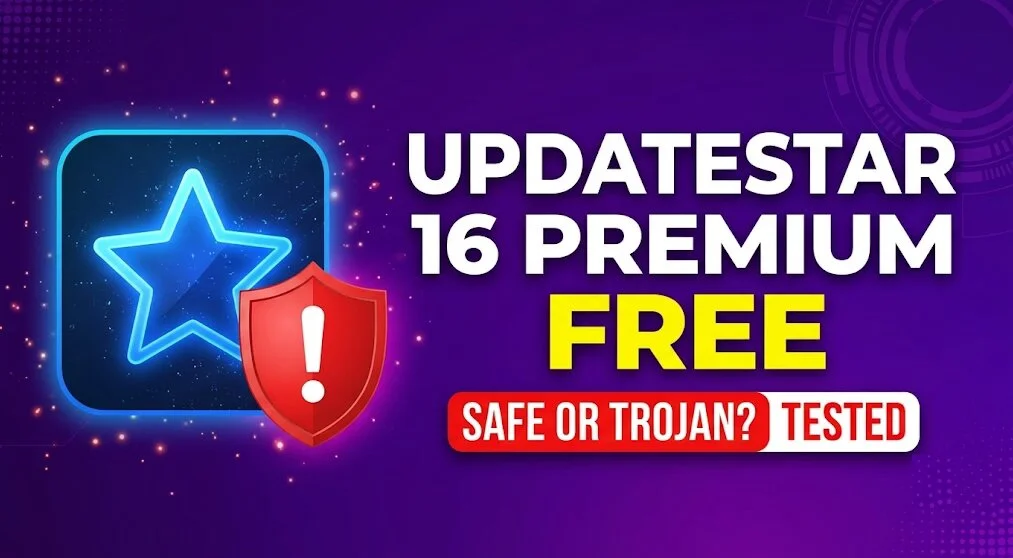
UpdateStar is giving away free Premium licences for its software updater. We claimed one and installed the program. Then Kaspersky Plus flagged it as a trojan and removed it. Below you’ll find the giveaway steps, our VirusTotal and Kaspersky results, and who should skip this one.
⚡ Quick Read
What: UpdateStar 16 Premium Edition, a Windows tool that finds and downloads updates for your installed programs.
Giveaway: A free Premium licence key sent by email. Normal price is $34.95 for one PC.
How: Enter your email, confirm the request, then paste the key into the Premium Edition menu.
Catch: Kaspersky blocks it as a trojan, so Kaspersky users can’t use it. Two other VirusTotal engines label it adware or a potentially unwanted app, and Kaspersky’s sandbox marked one file inside the installer as malware without naming it. The licence length isn’t stated.
Deadline: No end date given. The page was live on 23 Nov 2026. Jump to the steps
What is UpdateStar?
UpdateStar is a software updater for Windows from UpdateStar GmbH, a company that has been around since 2007. It scans the programs installed on your PC, checks them against its online database and tells you when a newer version is out. You can then download the update from inside the app.
There are two editions. The free edition checks for major updates once a week. The Premium edition, which this giveaway unlocks, adds more frequent scans and several extra tools. UpdateStar sells Premium for $34.95 for one PC or $79.95 for three PCs, according to its official features page.
The installer we downloaded on 23 Nov 2026 is version 16.0.125. WinFuture lists Windows 10 and Windows 11 (32-bit and 64-bit) as supported.
Key features of UpdateStar Premium
These are the Premium features as UpdateStar describes them. We couldn’t try them ourselves, because Kaspersky removed the program before it opened (more on that below).
- More updates: UpdateStar says Premium shows about 20 times as many updates as the free edition, including minor releases and patches.
- Flexible scans: Daily, custom or on-demand scans instead of the free edition’s weekly check.
- Verified downloads: UpdateStar says Premium downloads updates directly and checks them.
- Security analysis: Rates how risky each outdated program is, so you know what to update first.
- Import and export: Save your software list and move it to another PC.
- Registry cleaner: Removes leftover registry entries. Use it with care and keep a restore point.
- Licence backup: Stores the licence details of your installed programs.
Giveaway terms
| Item | Details |
|---|---|
| Product | UpdateStar 16 Premium Edition (installer version 16.0.125) |
| Normal price | $34.95 (1 PC) |
| Licence length | Not stated on the giveaway page or in the licence email |
| Requirements | An email address. Company name is optional. |
| Delivery | Confirmation email first, then the key by email. In our test the key arrived about 2 minutes after we confirmed. |
| System | Windows 10 and 11 |
| Deadline | None given. Live on 23 Nov 2026. |
| Antivirus note | Blocked by Kaspersky. Flagged by 3 of 59 engines on VirusTotal. |
How to get UpdateStar 16 Premium for free
⚠️ Using Kaspersky? Read this first
On our PC, Kaspersky Plus stopped UpdateStar as soon as it ran and removed it. Kaspersky now also flags the installer itself. If Kaspersky is your antivirus, skip this giveaway. Don’t turn off your antivirus to install it. See Is UpdateStar safe? for the full scan results.
Before you claim: UpdateStar doesn’t say how long the free licence lasts or when the giveaway ends.
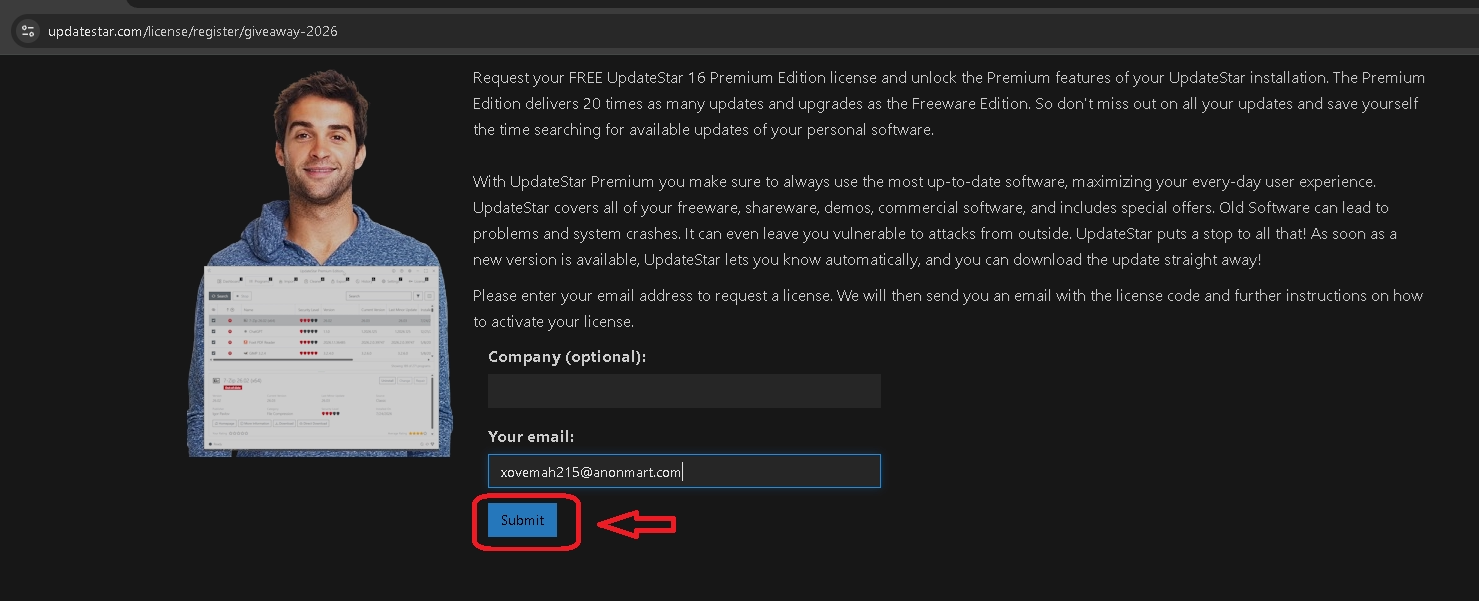
- Open the UpdateStar giveaway page using the button below.
- Enter your email address. The company field is optional. Click Submit.
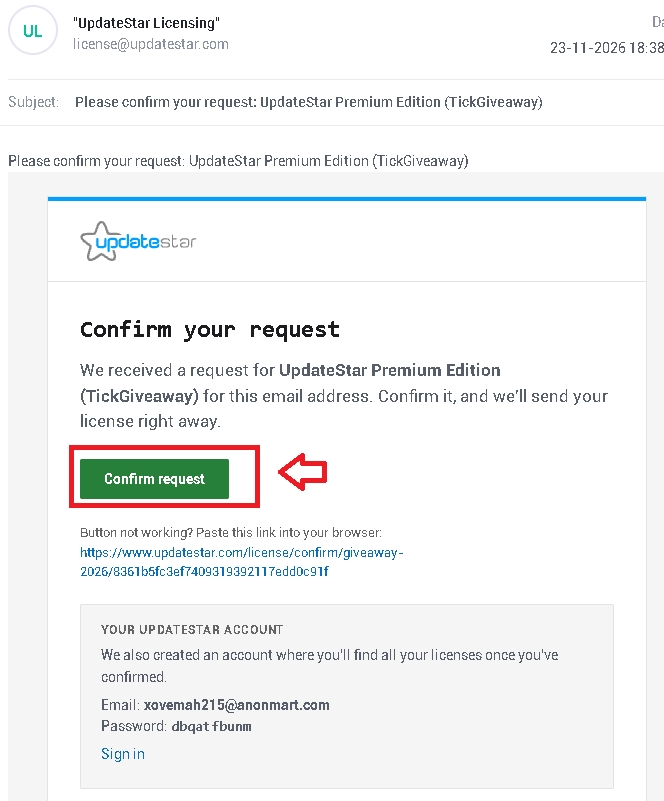
- Open the email from license@updatestar.com with the subject “Please confirm your request” and click Confirm request.
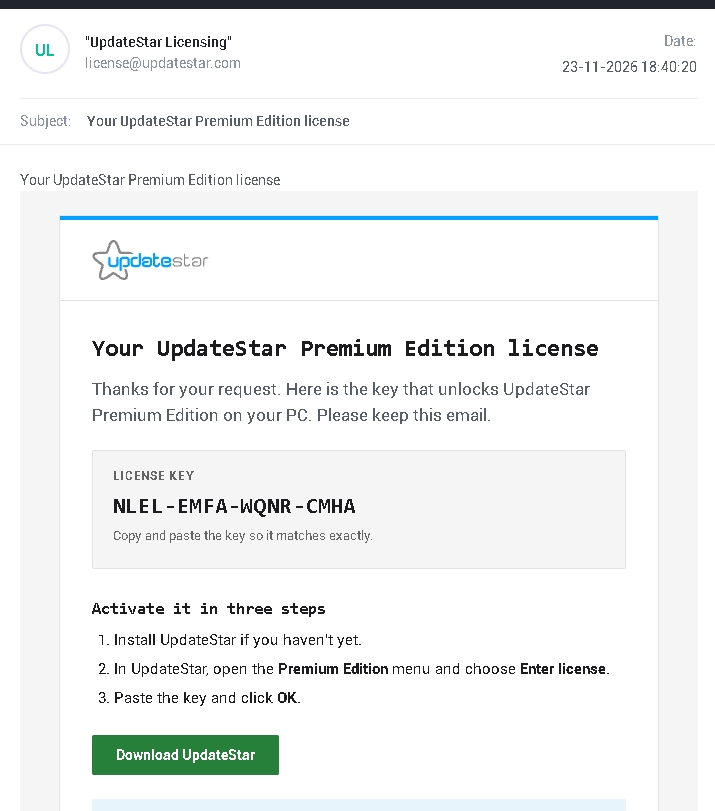
- A second email, “Your UpdateStar Premium Edition license”, brings your licence key. Keep it.
- Download the installer from UpdateStar’s site and install it.
- Open UpdateStar, go to the Premium Edition menu and choose Enter license.
- Copy the key from the email, paste it in and click OK. Pasting avoids typos; the email says the key must match exactly.
🎁 Open giveaway page ⬇️ Download UpdateStar (44.5 MB)
Check your download: SHA-256 of UpdateStar.msi (version 16.0.125, tested 23 Nov 2026)
259ba9cf393381ac879af5247717a502564d2143f84f30b84ebb5ebfafedc351
To check the hash, open PowerShell in your Downloads folder and run Get-FileHash .UpdateStar.msi. If UpdateStar has released a newer build since our test, the hash will be different. That’s normal.
🛠️ Troubleshooting
- No email? Check spam and promotions, and wait a few minutes before asking again.
- Key rejected? Paste it again with no spaces before or after.
- Program won’t open or vanished? Your antivirus probably removed it. Check its quarantine or history. Restore it only if you’re happy with the scan results below.
Our test: what happened
We requested a licence on 23 Nov 2026. The confirmation email arrived at once, and the licence key came about 2 minutes after we confirmed. The giveaway itself works.
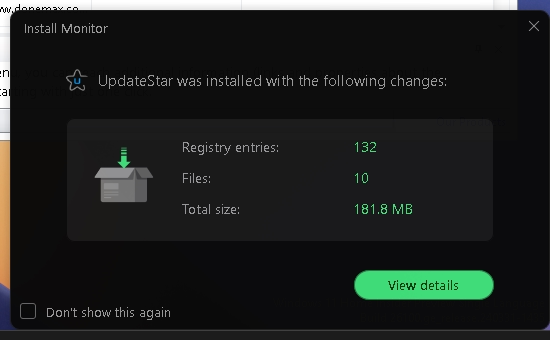
The installer ran without trouble. UpdateStar’s Install Monitor reported 132 registry entries and 10 files, 181.8 MB in total.
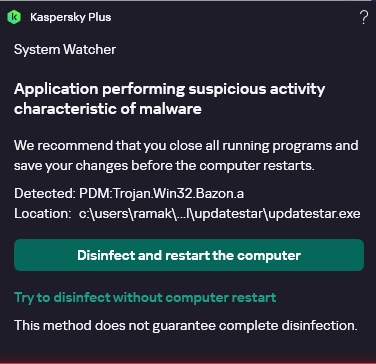
When UpdateStar started, Kaspersky Plus’s System Watcher stepped in. It flagged updatestar.exe as PDM:Trojan.Win32.Bazon.a, called it “suspicious activity characteristic of malware” and offered to disinfect and restart the PC. The program never opened, so we could not test activation or any Premium features.
Is UpdateStar safe?
Short answer: our checks lean towards a false positive or a “potentially unwanted application” detection rather than confirmed malware. The installer has a valid digital signature, its main program file got no detections from 67 engines, and Kaspersky’s sandbox recorded no overall detections. However, three VirusTotal engines flagged the installer, two of them as adware or a potentially unwanted application. Kaspersky’s sandbox also classified one extracted file as malware, and the free report doesn’t say which one. So we can’t guarantee that every component is safe.
Kaspersky’s two detections
Kaspersky flagged UpdateStar in two different places, with two different names. We can’t tell whether they share a cause, so here they are separately.
On our PC: PDM:Trojan.Win32.Bazon.a. This came from Kaspersky’s System Watcher, as the alert itself says, when the installed updatestar.exe started. System Watcher reacts to what a program does while running. Our interpretation is that an updater’s normal work (scanning installed programs, writing to the registry, downloading installers) can trigger it. Kaspersky’s support article on false detections confirms that its apps can wrongly block clean software and gives separate steps for PDM detections. We also found a Kaspersky forum report (in Chinese) of software from a well-known accessory maker getting the same Bazon.a alert.
On VirusTotal: UDS:Trojan.Win32.Scar.vbit. This is Kaspersky’s verdict on the installer file itself (UpdateStar.msi), not on the running program. Kaspersky doesn’t publish what triggered it.
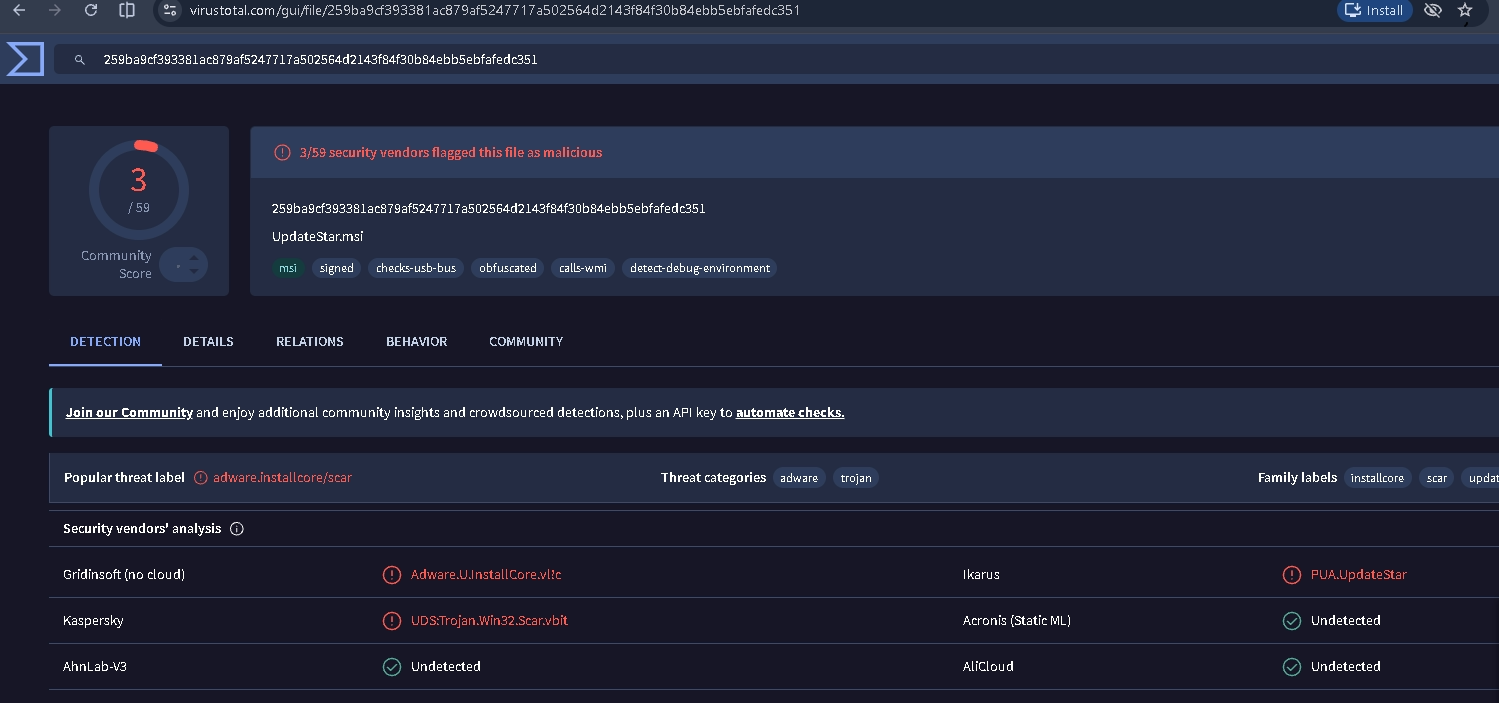
VirusTotal: 3 of 59
We uploaded the installer to VirusTotal. 3 of 59 engines flagged it:
| Engine | Detection | What it means |
|---|---|---|
| Kaspersky | UDS:Trojan.Win32.Scar.vbit | A trojan verdict on the installer file. Kaspersky doesn’t publish its reasons. |
| Ikarus | PUA.UpdateStar | “Potentially unwanted application”. Not malware. |
| Gridinsoft (no cloud) | Adware.U.InstallCore | An offline guess that the installer may bundle offers. |
The other 56 engines found nothing. The main program file inside the installer scored 0 of 67. The installer has a valid digital signature from UpdateStar GmbH, issued through Microsoft’s identity-verified signing service and timestamped by DigiCert. A valid signature confirms who published the file and that it hasn’t been changed since. It isn’t a guarantee that the program is free of unwanted components. The only internet addresses the installer contacted in VirusTotal’s analysis belong to UpdateStar.
Kaspersky’s own sandbox
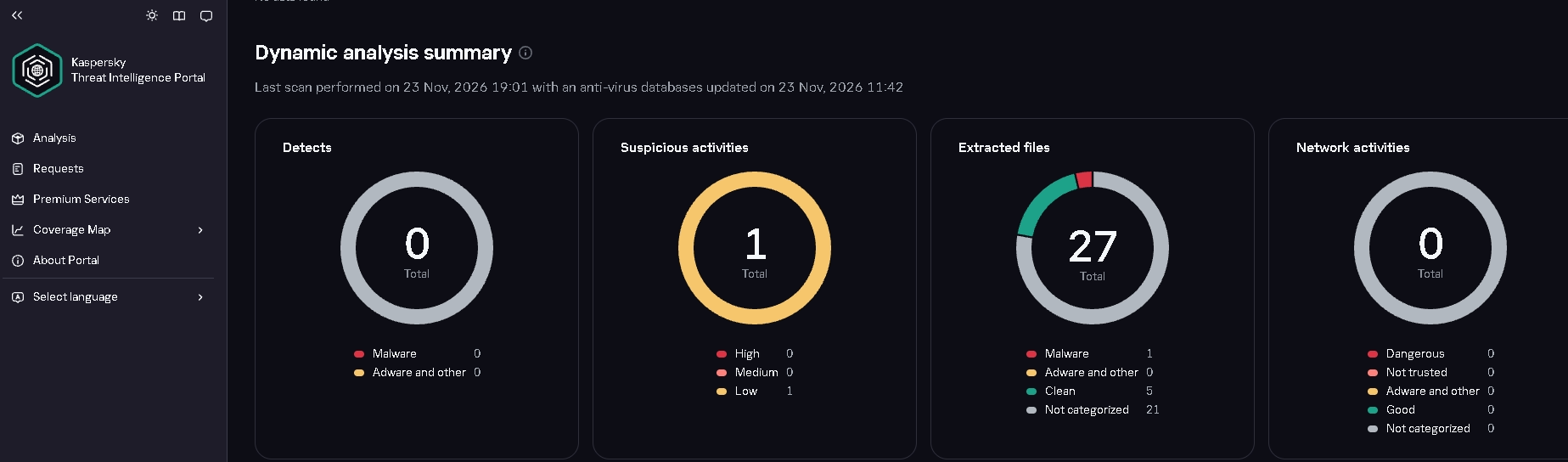
We also submitted the installer to Kaspersky’s OpenTip portal. Its dynamic analysis ran the file in a sandbox and recorded no detections, one low-level suspicious action and no network activity.
The zero-detection summary doesn’t mean every file got a clean verdict. The sandbox extracted 27 files from the installer: 5 clean, 21 not categorised and 1 classified as malware. You can see both in the screenshot below: “Detects” shows 0, while “Extracted files” shows 1 malware. The free version of the portal doesn’t say which file that is, so we couldn’t check it.
Our take
Most signs point away from a real infection: a valid signature from the real developer, a clean main program file and 56 of 59 engines finding nothing. But two engines point to adware or unwanted software, Kaspersky flags both the installer and the running program, and one extracted file stays unexplained. UpdateStar has been tagged as a potentially unwanted program before, too. We can’t call it fully safe.
If you still want to try it, download only from updatestar.com, read every setup screen and untick anything you didn’t ask for. If you can, test it first in Windows Sandbox or a virtual machine.
Who should grab it, and who can skip it
Consider it if you don’t use Kaspersky, you’re comfortable judging the scan results above, and you want one tool that tells you when your desktop programs need updating. Testing it in Windows Sandbox or a virtual machine first is the cautious route.
Skip it if Kaspersky is your antivirus, you’d rather wait for cleaner security results or a statement from UpdateStar, you don’t want a registry cleaner on your PC, or you’re happy updating through Windows and each program’s own updater. The other updater giveaways linked below are alternatives.
More software updater giveaways on Techno360
📊 Verdict
The giveaway itself works, and the licence arrives within minutes. However, we couldn’t verify Premium activation or confirm that every component of the installer is safe. Kaspersky users should skip it. Other users may prefer to wait for clarification from UpdateStar or cleaner security results before installing.
👍 Pros
- Free Premium licence worth $34.95, delivered in minutes
- Only an email address needed
- Installer is signed by UpdateStar GmbH and clean on 56 of 59 engines
👎 Cons
- Kaspersky blocks and removes it
- Two engines label it adware or unwanted
- Kaspersky’s sandbox flagged one extracted file as malware (unidentified)
- Licence length and deadline not stated
- We couldn’t test activation
FAQ
Is UpdateStar a virus?
We found no evidence of a confirmed infection, but we can’t call it fully clean. The installer is signed by UpdateStar GmbH and 56 of 59 VirusTotal engines found nothing. Two others label it adware or a potentially unwanted app, Kaspersky calls it a trojan, and Kaspersky’s sandbox classified one extracted file as malware without naming it.
Why does Kaspersky flag UpdateStar as a trojan?
Kaspersky flags it in two ways. On our PC, System Watcher flagged the running program as PDM:Trojan.Win32.Bazon.a, a detection based on behaviour. On VirusTotal, Kaspersky flags the installer file as UDS:Trojan.Win32.Scar.vbit. Kaspersky doesn’t explain either detection, and we can’t confirm whether they share a cause.
Can I use UpdateStar with Kaspersky?
Not without overriding Kaspersky, and we don’t recommend turning protection off for a giveaway. If you use Kaspersky, skip this one or wait to see whether Kaspersky clears the file.
How long does the free licence last?
UpdateStar doesn’t say. Neither the giveaway page nor the licence email mentions a term or expiry date.
Is the giveaway still available?
It was live when we tested it on 23 Nov 2026. UpdateStar gives no end date, so it could close at any time.
What’s the difference between the free and Premium editions?
The free edition checks for major updates once a week. UpdateStar says Premium shows about 20 times more updates, including minor patches, and adds daily or on-demand scans, security analysis, a registry cleaner and import/export of your software list.