

VideoProc Converter AI DigiArty software is one of those tools that really makes video work less painful. Whether you want to convert a 4K file, upgrade an old home video, or compress something before sharing it – this software handles it all without bothering you.
Right now, DigiArty is offering a Free 1 Year License VideoProc Converter for AI ($78.90 value) for a limited time. If you work with video even occasionally, it’s worth learning.
What is VideoProc Converter AI?
VideoProc Converter AI is a full-featured video processing suite for Windows and Mac. It goes far beyond basic conversion – you get GPU-accelerated transcoding, built-in AI tools for upscaling and enhancements, a media downloader, screen recorder, and a basic editor, all in one package.
The software is made by Digiarty (the same team behind WinX DVD Ripper) and has been around for years, but the AI version is a significant step up from older releases. The latest version (v8.9) adds improved super resolution models, improved frame interpolation, and support for Apple M4 chips.
What sets it apart from most converters is that Level-3 GPU Acceleration – It completely offloads processing to your GPU (NVIDIA, AMD, Intel, or Apple Silicon), which means encoding speeds. 47 times faster Compared to software-only tools, without the quality loss you’d expect.
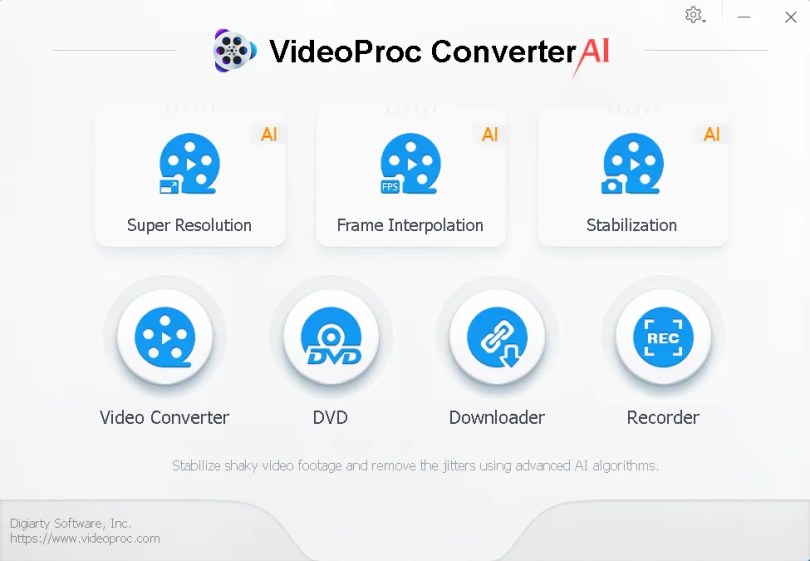
Key Features of VideoProc Converter AI
Here’s a quick rundown of what you actually get with this software:
- AI Super Resolution (up to 4x upscale): Convert old 720p or 1080p footage to clean 4K video using trained neural network models. It also works on images, upscaling them up to 10K.
- AI Frame Interpolation: Increase the video frame rate from 30fps to 60fps, 120fps or even 240fps – great for slow-motion content or smoother playback.
- AI Video Stabilization: Automatically removes vibration from handheld or drone footage.
- 420+ output formats: Supports almost every format you need – MP4, MKV, MOV, HEVC, AV1, ProRes, and device-specific profiles for iPhone, iPad, Android, PS5, and more.
- 370+ input codecs: It works with almost any video file you throw at it, including 4K HDR, 3D and 360° VR content.
- GPU-accelerated encoding: Works with NVIDIA (GeForce GT 630+), Intel (HD Graphics 2000+), AMD (Radeon HD 7700+), and Apple silicon (M1 to M4 Pro/Max/Ultra).
- Video Compression: Reduce file size by up to 90% without visible quality loss – ideal for sharing large recordings.
- DVD ripping: Digitize DVD collection to MP4, AVI, MKV, or audio formats with 6 different backup modes.
- Online Video Downloader: Download videos, playlists, channels, and M3U8 streams from 1,000+ websites including YouTube, Facebook, and more.
- Screen & Webcam Recorder: Three capture modes – screen only, webcam only, or both together. Includes chroma key, annotations, and voiceover.
- Basic Video Editor: Cut, trim, merge, crop, rotate, add watermark, create GIF, fix fisheye distortion, remove noise, and much more.
If you’ve used older video converters that kept your CPU at 100% and took 20 minutes to process a 5-minute clip, VideoProc’s GPU acceleration is a welcome change. It takes much less time to process 4K files than software-based tools.
How good is AI upscaling?
The Super Resolution feature uses a neural network model (Zen Detail v3 in the latest version) to intelligently reconstruct missing details during upscaling. In practice, it can take soft 1080p footage and make it look really close to 4K – not just stretched, but with actual detail enhancement.
It’s not at the level of Topaz Video AI in terms of raw sharpness, but it’s remarkably close for a device that costs a fraction of the price. For most use cases – old home videos, YouTube content, upscaling anime – it does a solid job. The AI Image Enhancer can upscale images to 10K resolution, as well as handle denoising, deblurring, and face restoration.
System Requirements
- Windows: Windows 7/8/10/11 (64-bit recommended)
- Mac: macOS 10.13 (High Sierra) or later, including Apple silicon (M1 to M4)
- To hit: Minimum 4GB (8GB recommended for 4K processing)
- GPU: NVIDIA GeForce GT 630+, AMD Radeon HD 7700+, Intel HD 2000+, or Apple M1/M2/M3/M4
- storage: At least 200 MB free space for installation
Get VideoProc Converter AI for free
Digiarty runs free campaigns for VideoProc Converter AI from time to time. The current offer gives you a Free 1 Year Full License – No watermarks, no feature restrictions, no tricks.
[New Giveaway — Version 7.7]: :
Download the installer from: https://videoproc.com/download-giveaway.
Install the software and activate it with the license code below.
license code: DAS6G-C2FYQ-QNXW4-4IZBC
Is VideoProc Converter AI worth it?
At the regular price of $78.90 for a lifetime license, VideoProc Converter AI offers solid value compared to purchasing separate tools for conversion, compression, downloading, and recording. The free gift makes the decision even easier – there’s no reason not to try it.
Where it really shines: Compression and conversion speed. If you regularly work with large 4K files or need to compress videos for sharing, this will save you a lot of time. AI upscaling is a nice bonus that really gives good results for everyday use.
Where it falls short: The editing tools are basic, and AI upscaling doesn’t quite match dedicated upscalers like Topaz Video AI for professional work. But as an all-in-one tool for most users, it covers the bases well.
More Free Video Software Gifts
If you’re looking for other free video tools, check out these goodies we’ve covered on Techno360:
Frequently Asked Questions
Question: Is this the full version or a trial?
Answer: This giveaway provides a full 1-year license without any feature restrictions or watermarks.
Question: Does VideoProc Converter AI work on Mac?
Answer: Yes – it works on both Windows and Mac, including those with Apple Silicon (M1, M2, M3, M4) chips.
Q: Can I update the software after the free period?
A: Free licenses generally do not include free updates after the license term. See the official site for details on upgrading.
Question: Is it safe to download?
Answer: Yes – VideoProc is made by Digiarty Software, an established company. Download only from the official link given above.
Learn more from Techno360
Subscribe to get the latest posts delivered to your email.


